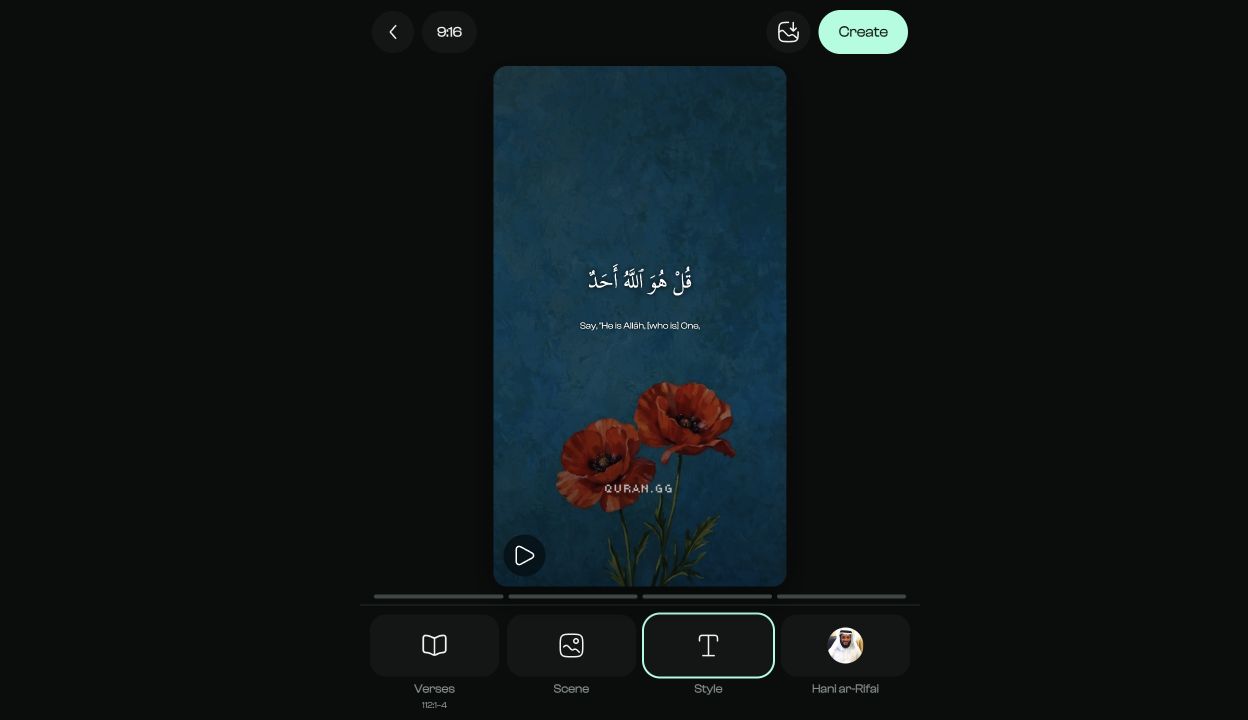
Creating a Quran video does not have to involve finding verse text, importing recitation, and timing every ayah by hand in a general video editor. Quran.GG brings the verse selection, reciter, scene, text styling, preview, and video export into one online workflow.
Key takeaways
- Quran.GG creates videos from one ayah or up to 10 consecutive ayahs from the same surah.
- The editor includes Quran recitation, Arabic text, an optional Saheeh International translation, photo or video scenes, and a live preview.
- Available output shapes are 9:16, 4:5, 1:1, and 16:9.
- Every generated video should be watched in full and checked before it is published.
A purpose-built Quran video maker can combine Quran verses, recitation, and a visual scene without making you assemble every element separately. With Quran.GG, you can configure a verse video in your browser and export a result for Reels, TikTok, YouTube Shorts, standard YouTube videos, or square and feed posts.
What is a Quran video?
A Quran video combines Quran recitation with the corresponding Arabic ayah text and a visual background. Depending on the presentation, it may also include the surah and ayah reference, a translation, and text that advances as the reciter moves through the selected ayahs.
- Arabic Quran text
- Quran recitation
- The surah and ayah reference
- An optional translation
- A photo or video scene
- Ayah-by-ayah timing for a multi-verse selection
The manual alternative takes several separate steps: finding reliable Quran text, obtaining the matching recitation, timing the text against the audio, designing the frame, and exporting the correct dimensions. A dedicated Quran verse video maker reduces that repetitive setup.
How Quran.GG creates a Quran video
There are two ways to begin. You can open the Quran reader, move to an ayah, and choose Create to carry that ayah into the creator. Or you can open the creator directly, choose a scene, and add verses inside the editor.
- Choose a photo or video scene.
- Choose one ayah or a consecutive range from one surah.
- Select a reciter.
- Adjust the text style, translation, and scene readability.
- Choose the output aspect ratio.
- Review the live preview.
- Create, watch, download, or share the finished video.
1. Choose a photo or video scene
The direct creator starts on Pick a scene. You can browse all scenes or filter the library to Photos or Videos. Choose one and select Start editing. The choice is not permanent; the Scene tool lets you replace it later.
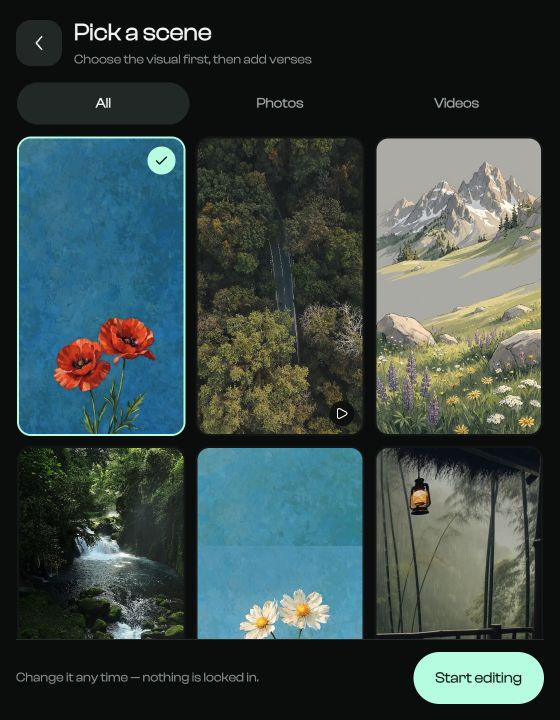
Choose a scene that supports the ayah rather than competing with it. Nature, architecture, skies, water, restrained motion, and simple textures can work well. If a scene is detailed, use the Scene controls to add dimming, blur, zoom, vignette, or a tint so the Quran text stays legible.
2. Choose the ayah or passage
Open Verses in the editor. Search for a surah by English name, Arabic name, or chapter number, or search for a word or phrase to find a matching ayah. After choosing the surah, set the From verse and To verse fields.
Current selection limit: Quran.GG supports one ayah or up to 10 consecutive ayahs from the same surah in a single video.
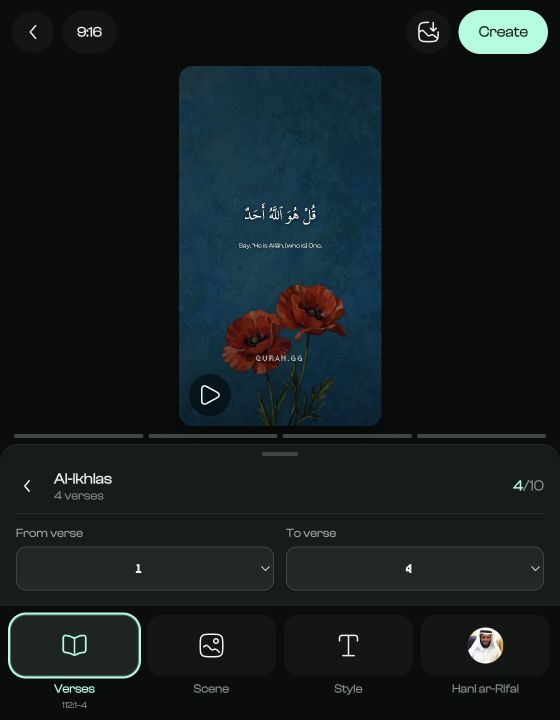
Short selections are usually easier to read and listen to in short-form content. For a longer passage, consider a sequence of videos rather than crowding many ideas into one clip. Starting from Quran.GG also avoids copying Arabic text from an unverified social-media graphic.
3. Choose a Quran reciter
Open Reciter and choose from the voices currently available in the editor. Quran.GG previews the selected ayahs with that recitation, so you can listen before creating the final video.
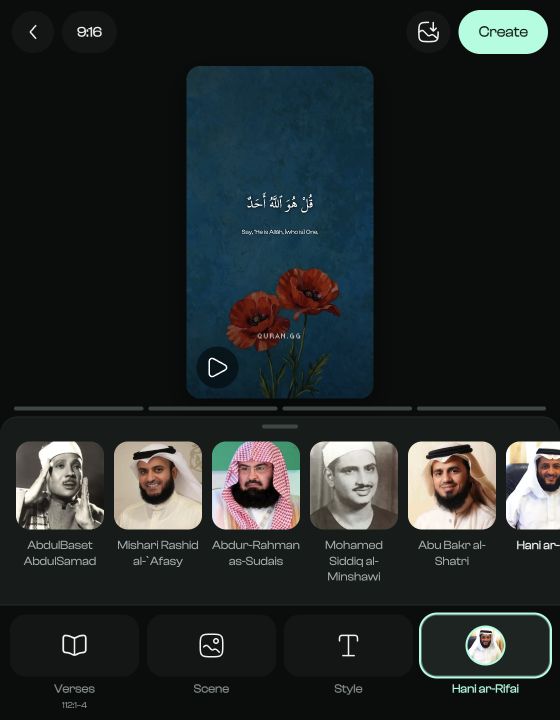
Different reciters have different pacing and vocal styles. A slower recitation may suit a reflective piece, while a short social clip may work better with a shorter passage. Do not speed up the recitation simply to force a passage into a target duration; shorten the selection or allow the video to run longer.
4. Style the text for readability
The Style panel offers three Arabic Quran fonts, an ayah color control, and a switch for the English translation. The translation currently used by the creator is Saheeh International. The Arabic text remains the Quran; the English line is a translation of its meaning.
- Keep strong contrast between the text and scene.
- Use the live preview to check long Arabic lines and the translation.
- Avoid placing the important text at the extreme top or bottom of a vertical frame.
- Use a quieter scene or increase dimming if the words compete with the background.
5. Choose the right video format
Use the aspect-ratio button at the top of the editor. Quran.GG provides four output formats:
Video formats available in Quran.GG
| Aspect ratio | Resolution | Editor label | Typical use |
|---|---|---|---|
| 9:16 | 1080 × 1920 | Reels / TikTok | Vertical short-form video |
| 4:5 | 1080 × 1350 | Instagram feed | Portrait feed post |
| 1:1 | 1080 × 1080 | Square post | Square social post |
| 16:9 | 1920 × 1080 | YouTube | Horizontal video |
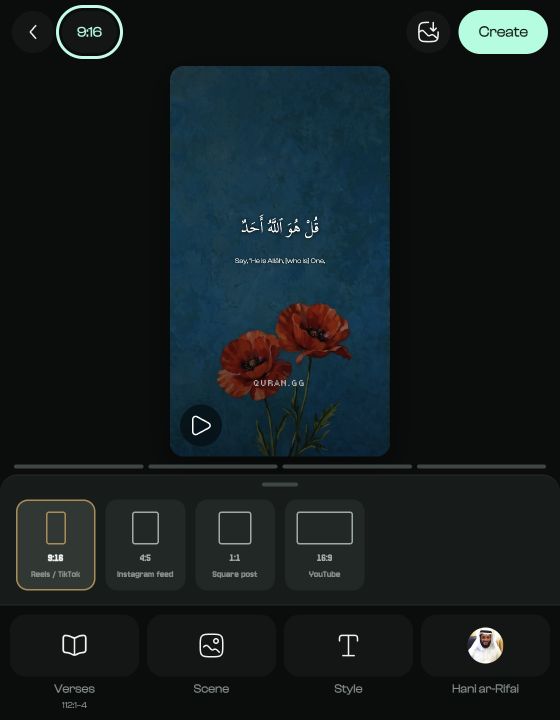
For a full-screen Instagram Reel or TikTok video, choose 9:16. Instagram accepts Reel ratios from 1.91:1 through 9:16, and TikTok recommends the full-screen 9:16 format. YouTube accepts square or vertical videos as Shorts; Quran.GG labels 9:16 for Reels and TikTok and also provides 1:1 when a square output is appropriate. 1 2 3
6. Preview the ayahs with the recitation
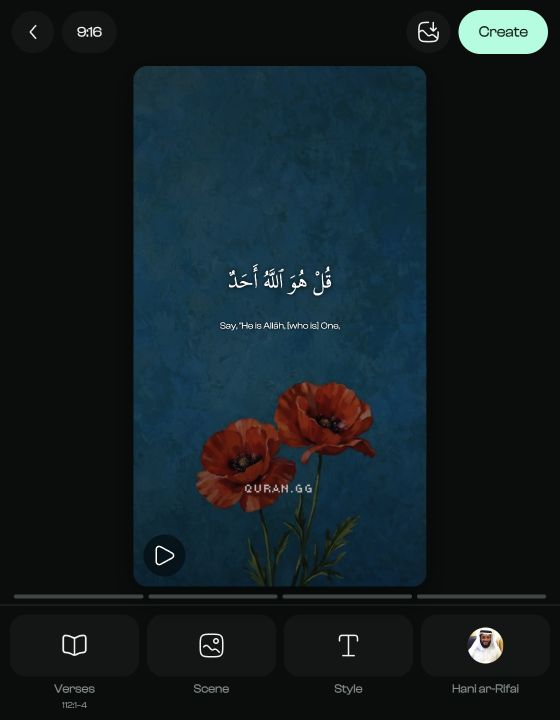
Press Play in the editor and watch the selected passage. For a multi-ayah selection, the preview provides a marker for each ayah and advances the displayed content with the recitation. This is the synchronization work that would otherwise need to be created manually in a general-purpose editor.
7. Create, review, and download the video
When the verses, reciter, and scene are ready, choose Create. Quran.GG renders the video and shows its progress. Keep that screen open until the result is ready. The finished screen lets you watch the rendered file, download it, open the device share flow, or return to the editor to make another version.
Review before publishing: Rendering is not the final quality check. Watch the exported video from beginning to end before uploading it anywhere.
- Confirm the selected surah, ayah range, and Arabic text.
- Listen to the beginning and ending of the recitation.
- Check that each displayed ayah matches what is being recited.
- Read the translation if it is enabled.
- Check text contrast, crop, and scene movement.
- Preview the exported file on a phone before posting vertical content.
How to make a Quran Reel
A Quran Reel uses the same creation process with extra attention to vertical viewing. Choose 9:16, keep the passage concise, make the Arabic large enough for a phone, and keep important content away from the interface-heavy edges of the frame. 1
- Choose a passage that fits naturally into a short video.
- Select the 9:16 Reels / TikTok format.
- Keep the Arabic text and optional translation readable on mobile.
- Use a restrained scene with sufficient contrast.
- Listen to the complete recitation and check every ayah transition.
- Watch the exported video on a phone before posting.
How to make Quran videos without editing software
You do not need Premiere Pro, Final Cut Pro, After Effects, CapCut, or another general-purpose editor when your goal is a clean Quran verse video with recitation, text, a translation, and a visual scene. Quran.GG runs in the browser and handles the Quran-specific selection and timing workflow.
Quran video maker compared with a general video editor
| Quran video maker | General video editor |
|---|---|
| Designed around Quran content | Designed for many types of media |
| Surah and ayah selection is built in | Quran text is usually added manually |
| Reciter selection is built in | Audio is normally sourced and imported separately |
| Ayah-level timing is handled by the workflow | Timing is usually created on a timeline |
| Four ready-made social and video formats | Flexible canvases with more setup |
| Faster for straightforward verse videos | More control for complex custom productions |
A traditional editor remains useful when you need advanced motion graphics, custom compositing, or a larger production. A dedicated Quran video creator is more direct when the purpose is to create and share a clear verse video efficiently.
What makes a good Quran video?
Clear Quran text
The Arabic should be prominent, correctly rendered, and easy to read without zooming.
Clean recitation
The recitation should begin and end naturally and remain the audible focus.
Accurate synchronization
The ayah on screen should correspond to the ayah being recited.
Simple visual design
The scene should complement the Quran content rather than demanding more attention than it.
Correct verse selection
Confirm the surah and ayah range in the Verses panel before rendering.
Appropriate pacing
Give viewers enough time to listen to the recitation and read what is shown.
Ideas for Quran videos
- A single-ayah video
- A short Quran reminder
- A verse-by-verse series
- A passage from a particular surah
- Quran recitation over a nature scene
- A vertical Quran Reel, TikTok, or YouTube Short
- Arabic Quran text with the English translation
- An ayah discovered while reading Quran.GG
Beginning with an ayah you encounter while reading—rather than searching for content solely for social media—helps keep the Quran itself at the center of the process.
Should you add a translation?
A translation can help people who do not understand Arabic follow the meaning. Quran.GG lets you show or hide its English Saheeh International translation from the Style panel.
Do not present a translation as though it is the Arabic Quran itself. Keep the visual distinction clear, and avoid crowding Arabic text, translation, references, captions, and other overlays into the same small frame. A simpler presentation is often easier to understand.
Create your first Quran video
You do not need to build every Quran video from scratch. Start with one short passage, keep the scene and text treatment simple, review the complete export carefully, and then adapt the workflow for the platform where you plan to share it.
Ready to begin? Create a Quran video with Quran.GG →
Frequently asked questions
What is a Quran video maker?
A Quran video maker is a tool designed to combine selected Quran verses, matching recitation, Quran text, and visual elements into a shareable video. It reduces the manual work needed in a general video editor.
Can I create Quran videos online?
Yes. Quran.GG runs in the browser and provides verse selection, reciters, scenes, styling, previews, and video rendering without requiring a desktop video editor.
How do I create a Quran Reel?
Choose a short passage, select a reciter and scene, use the 9:16 Reels / TikTok format, check text readability in the preview, then create and review the full exported video before posting.
What size does Quran.GG create for Reels, TikTok, or Shorts?
The Quran.GG 9:16 format renders at 1080 × 1920 pixels. The editor also provides 4:5 at 1080 × 1350, 1:1 at 1080 × 1080, and 16:9 at 1920 × 1080.
Can I make Quran videos without CapCut or Premiere Pro?
Yes. When you need Quran text, matching recitation, a visual scene, and a shareable video, Quran.GG can handle that workflow without CapCut, Premiere Pro, or another general-purpose editor.
How many ayahs can I use in one Quran.GG video?
You can currently choose one ayah or a range of up to 10 consecutive ayahs from the same surah.
Which English translation does the video maker use?
Quran.GG currently uses the Saheeh International English translation in both the creator preview and the final rendered video. You can show or hide it from the Style panel.
Should I check a Quran video before sharing it?
Yes. Watch the entire exported video and verify the Quran text, selected surah and ayahs, recitation, ayah transitions, translation if enabled, crop, and readability before publishing.
Sources
- Reel size and aspect ratios on Instagram— Instagram Help Center
- TikTok Creative Quality Control Checklist— TikTok for Business
- Upload YouTube Shorts— YouTube Help